
Received a suspicious phone call?
Scammers may contact you by phone and try to trick you, asking you to share personal information or even make a payment.
What is phishing?
Phishing is a type of scam in which criminals attempt to obtain your personal information. They do this by sending emails, for example, posing as a trusted party, such as a bank or health insurance fund. You are then asked—often urgently—to update your information by clicking a link that looks like one you know, but which takes you to a fake website.
How do you recognize fake emails?
Check the sender
Do you only see the sender's name and no full email address? You can check this by pointing at it (computer) or holding your finger on the name for a second (phone/tablet).
✅ CM always sends emails with a sender ending in '@cm.be' or '@info.cm.be'.
❗ Remain vigilant even with senders who appear safe and check the entire message.
❌ Other senders are to be distrusted.
Check the link WITHOUT clicking on it
A fake email often asks you to update your personal information by clicking a link. Check the link by pointing at it without clicking (computer) or by holding your finger on the link for a second without tapping (phone/tablet).
✅ CM will always redirect you in emails to www.cm.be, mijn.cm.be or campaigns.cm.be.
❌ Other sites are to be distrusted.
Emails with a link that does not point to the CM site:
- Definitely do not click on the link.
- Forward the email to [email protected].
Worked example (in Dutch)
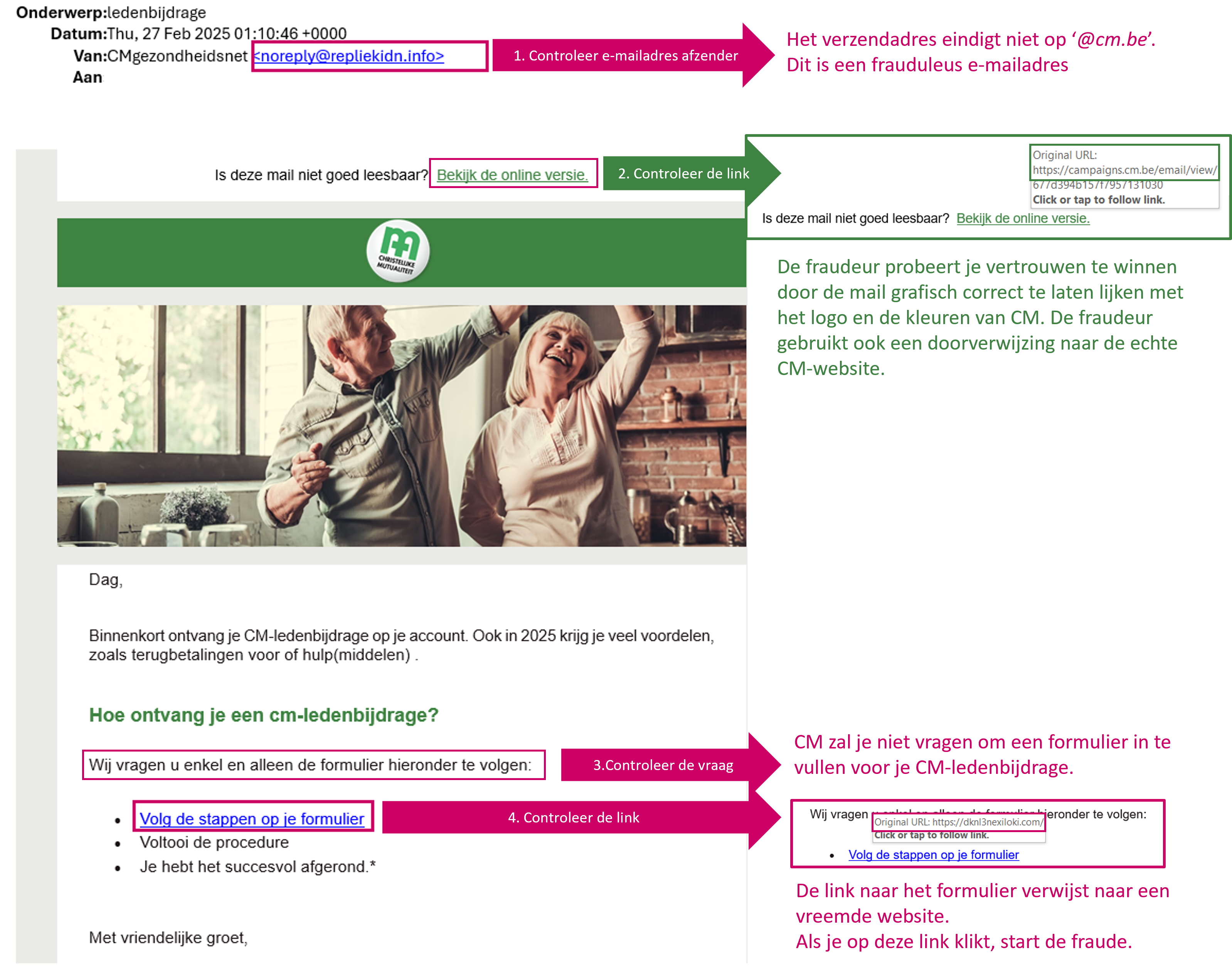
We'll use a recent example to show you how to recognize a phishing email. As a CM member, you regularly pay a fee. Fraudsters know this and exploit it with emails that try to trick you. They'll trick you into transferring your contribution to a different account, or try to steal your personal information to commit further fraud. Click on the image to enlarge it.
What to do if you are not sure?
Fake emails capitalize on uncertainty. Are your details still correct? Change them before it's too late... Scammers do this to get you to click on the fake link in the email. If you do want to check your data:
- Go to the CM site with the URL https://www.cm.be and log in to your profile to check your details there.
- Contact CM and request information about the email.
- Report suspicious emails or situations.
How do you report fraud?
Think you've fallen victim to phishing or another form of online fraud? The SafeOnWeb website offers numerous useful tips. These include how to recognize phishing websites, what to do if you've already provided your information, what to do if you discover your data has been compromised, and how to set up two-step verification .
Are you receiving suspicious emails or calls from CM? Read how and to whom you should report them.
How do you recognize secure emails from CM?
CM uses security standard for e-mail
This email security standard (BIMI) helps verify the sender of an email. It functions as a kind of visual identity check.
Not all email providers support this standard yet. Gmail, for example, does, but Telenet and Proximus do not yet.
How does it work?
- CM will add the official logo to the emails we send to you.
- Does your email provider already use this standard (BIMI)? Then the provider will check whether the email meets the security requirements and actually comes from a secure sender. Only organizations that adhere to strict security guidelines are allowed to display their logo. This prevents scammers from misusing the CM logo.
- If the email meets the requirements, the CM logo will automatically appear next to the sender in your inbox. You don't need to do anything. The logo means the email is reliable and truly comes from CM.
Examples: mail without and with BIMI
Do you have an email provider that doesn't support this yet?
- Be extra vigilant and look for anomalies: no logo or an unfamiliar logo? This could be a sign that the email isn't from CM or isn't secured via BIMI. In that case, be extra careful and don't open any suspicious links or attachments.
- Official sender addresses: Check if the sender uses an official CM domain in the email address, such as **@cm.be**. Never use an email from a foreign or unknown domain without verification.
Why is BIMI important to you?
- It helps prevent phishing by immediately showing whether an email from CM is reliable.
- It provides visual confirmation that the email has been checked and secured.
- It makes it easier to distinguish genuine emails from fraudulent messages.